Selling
Sell on credit (pay later)
Let a customer take goods now and pay all or part of the money later, and keep a record of what they owe.
Before you start
- The customer's **name** and **phone number**
Step 1: Add the goods as usual
Read: Make a saleAdd the products to the basket and go to the payment step, just like a normal sale.
Step 2: Nothing paid now: tap Pay later
Under Amount received, tap Pay later. The whole total becomes money owed.
Step 3: Part paid now: type what they gave
If the customer pays some money now, choose how they paid (Cash, Transfer or POS / Card) and type the amount in Or type the amount. For example, a ₦10,000 sale where they pay ₦6,000 now leaves ₦4,000 owed.
Step 4: Fill in the customer
The Customer box opens by itself. Type their Phone and Name. If they have bought from you before, their name appears under the boxes: tap it to fill both in.
Be careful:Name and phone are a must when money is owed. Without them ShopBook won't save the sale, because you couldn't remind them later.
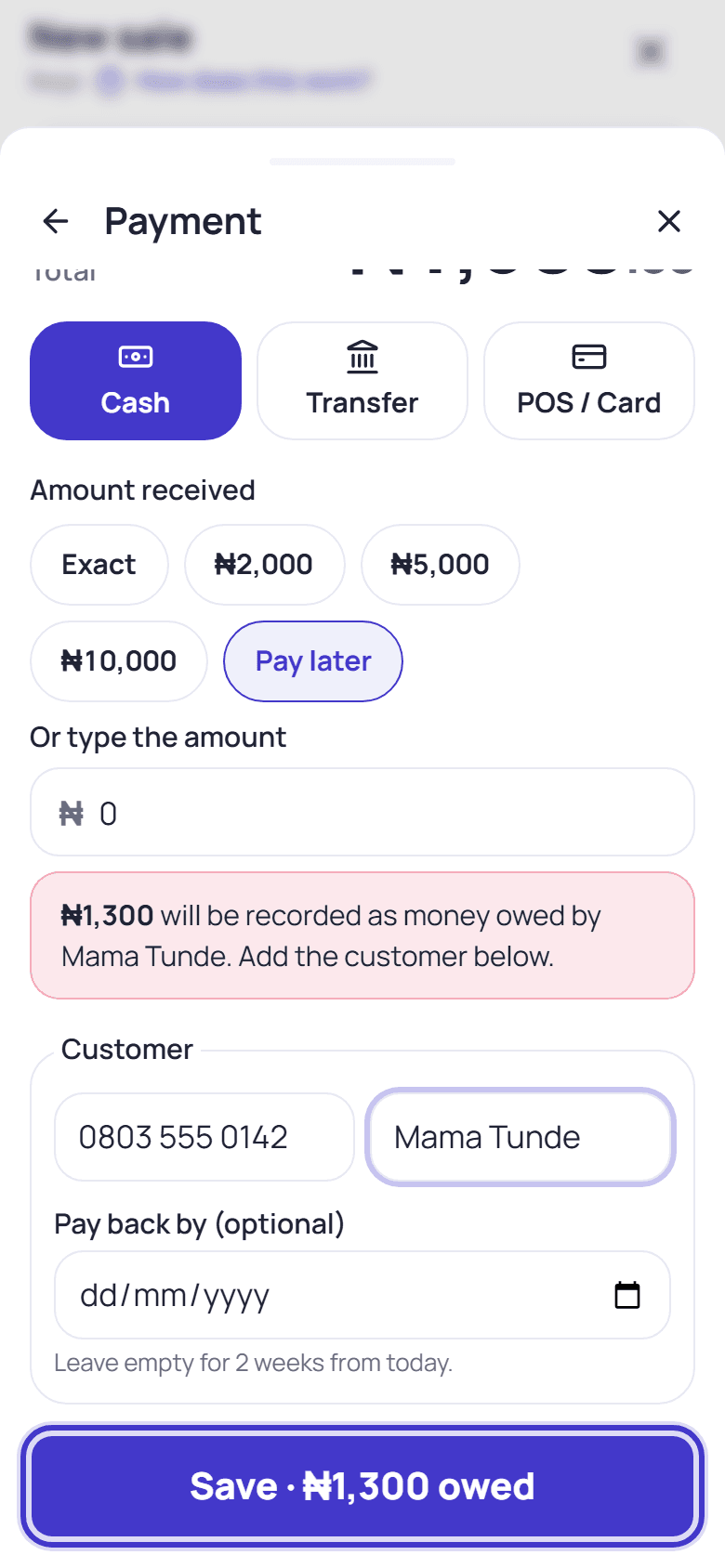
Step 5: Choose the pay-back date (optional)
Pick a date in Pay back by (optional). If you leave it empty, ShopBook gives them 2 weeks from today. After that date the debt shows as Overdue.
Step 6: Save the sale
The button now shows what is owed, for example Save · ₦4,000 owed. Tap it. The done screen says Ada owes ₦4,000. It's in Customer debt.
Read: Collect a debt paymentTip:When they come back to pay, open Customer debt, tap their name and use Collect payment.