Customer debt
See who owes you money
One list of every customer who hasn't finished paying, what they owe and who is late.
Step 1: Where debts come from
Read: Sell on credit (pay later)A debt is made by itself when a sale isn't fully paid: the customer chose Pay later, or paid only part of the money. In a restaurant, a tab closed on credit also lands here.
Step 2: Open Customer debt
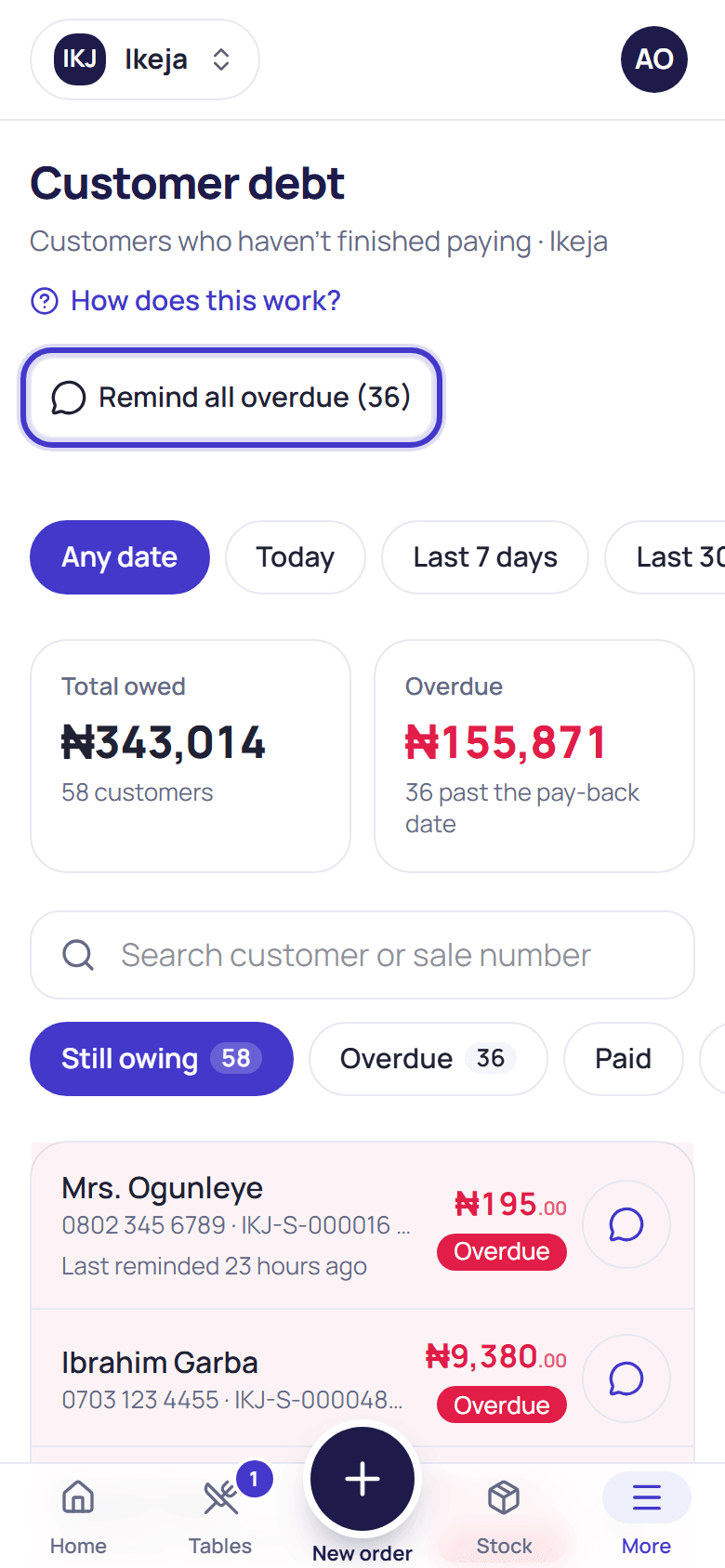
Tap Customer debt in the menu. At the top you see:
- Total owed: all the money customers still owe you.
- Overdue: the part that is past the pay-back date.
Step 3: Choose what to show
Tap Still owing (the usual list), Overdue, Paid or All. The list starts with the debts that are due soonest.
Step 4: Read each line
Each line shows the customer's name, phone, the sale number and pay by date, and the amount still owed. The label tells you where it stands:
- Not paid: nothing paid back yet.
- Part paid: some money came in.
- Overdue: the pay-back date has passed (shown in red).
- Paid: fully paid.
- Cancelled: the sale was cancelled.
Step 5: Find one customer
Type a name, phone number or sale number in Search customer or sale number. To see only credit given on certain days, change Any date to a period like This month.
Step 6: Open a debt
Read: Collect a debt paymentTap a customer to see Still owed, Paid so far, the Pay back by date and every payment received. From here you can collect money or send a WhatsApp reminder.